Creates a trip by chat
The employee tells AeonX IQ where and when they are travelling. It creates the trip request.
AeonX IQ
AeonX IQ is part of Xpense. Employees create trips and log expenses by chat, approvers get a summary and a rating on each report, and the same assistant works on WhatsApp.
The employee tells AeonX IQ where and when they are travelling. It creates the trip request.
AeonX IQThe employee describes what they spent. AeonX IQ logs the expense.
AeonX IQAeonX IQ writes a summary on each expense report for the approver.
The same assistant works on WhatsApp: file expenses and create trips by chat.
On WhatsAppAeonX IQ does not act on its own. When you ask it to log an expense or raise a trip, it shows you what it is about to create and waits. Nothing is created or submitted until you confirm.
In the mobile app AeonX IQ has its own Chat tab. You can type, send a photo or a PDF of a bill, or use the voice mode.
More about AeonX IQAsk AeonX IQ to list your trips, your expenses or your reports.
Ask it to check an expense against policy.
It helps approvers with trips and reports.
Summaries appear on expense reports, advances and trips.
Smart Approver gives each submitted report a green, amber or red rating, with a reason. The approver sees the rating beside the report.
The rating is something to read. The approver still opens the report and decides.
An employee types what they spent, or sends a photo of the receipt, and the expense is logged. A trip is raised the same way, with one message.
Approvers are reached on WhatsApp too. The approval request arrives with a link that opens it in Xpense.
Xpense on WhatsApp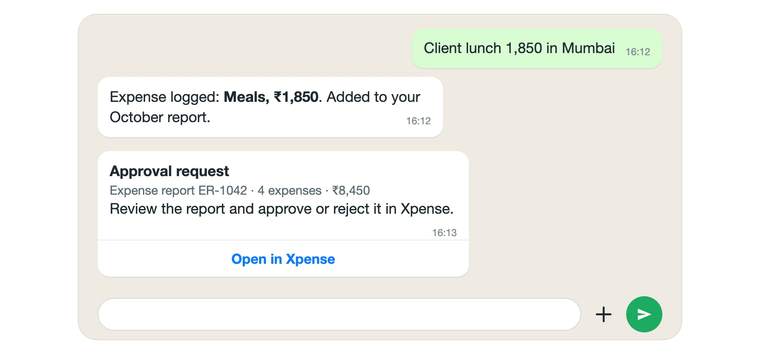
Receipts are read automatically using OCR, so the employee checks the claim instead of typing it.
Duplicate detection flags a receipt that matches one already submitted.
Receipt reading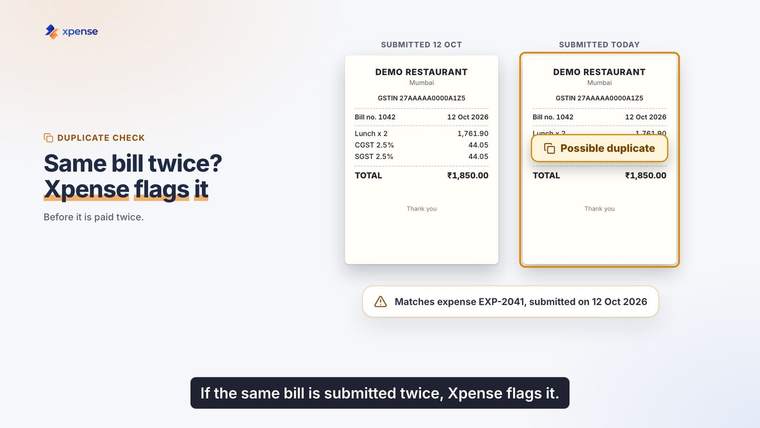
AI features are switched on per company from an AI control plane. A company that does not want them leaves them off.
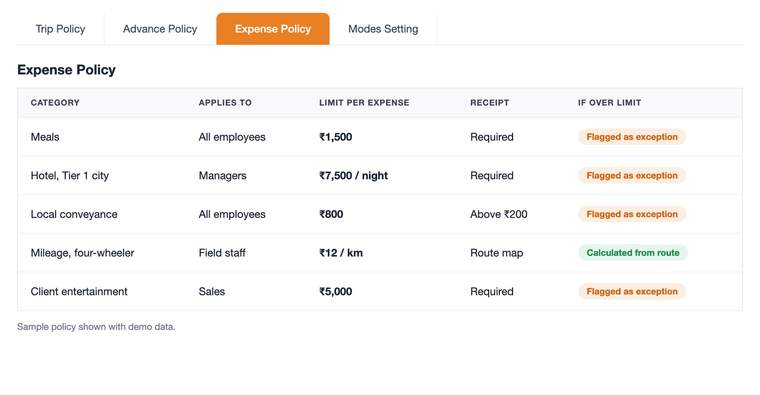
AI usage is metered, with plans and budgets. Policy checks are separate from all of this: they are rule-based and apply the rules you set.
If your company already uses an AI assistant or builds its own agents, they can work with Xpense through the Model Context Protocol.
Xpense has an MCP server, so AI assistants and agents that speak the Model Context Protocol can work with Xpense.
Every MCP call carries the employee's own sign-in token and is bound to one company. An assistant can do only what that employee can do.
The tools cover Xpense operations such as trips, expenses, advances and reports.
An assistant that speaks the Model Context Protocol works with Xpense through the MCP server. Every call carries the employee's own sign-in token and is bound to one company, so the assistant can do only what that employee can do.
AeonX IQ is the assistant inside Xpense. An employee can create a trip or log an expense by chatting with it.
AeonX IQ writes a summary on each expense report, so the approver can read the summary before opening the report.
Yes. The same assistant works on WhatsApp, where employees can file expenses and create trips by chat.
No. AeonX IQ asks you to confirm before it creates or submits anything.
It has its own Chat tab. You can type, send a photo or a PDF of a bill, or use the voice mode.
It can list your trips, expenses and reports and check an expense against policy. It also helps approvers with trips and reports.