Company trips
Booked inside a trip request, checked against travel policy, approved, and paid from the company travel wallet.
Company trips
For a company trip, the flight is searched and booked inside the trip request, checked against your travel policy and ticketed after approval. For a personal trip, the employee books and pays for the ticket themselves.
Booked inside a trip request, checked against travel policy, approved, and paid from the company travel wallet.
Company tripsBooked by the employee from the Personal tab in the app, or from Self Travel on the web, and paid for by the employee. No trip request and no approval.
Personal tripsThe booking lives inside the trip request, so the approver sees the fare before the ticket is issued.
The traveller raises the trip, with policy applied.
One-way or round-trip, a fare calendar, cabin class and preferences.
Each fare shows whether it is in policy or needs approval.
The trip goes through your approval levels.
The ticket is issued and stays on the trip.
Cancel from the same screen, charges shown first.
The trip request, the city picker, the search and the flight on the trip, as they look in the Xpense app.
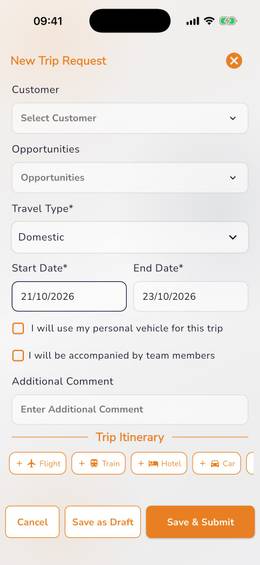
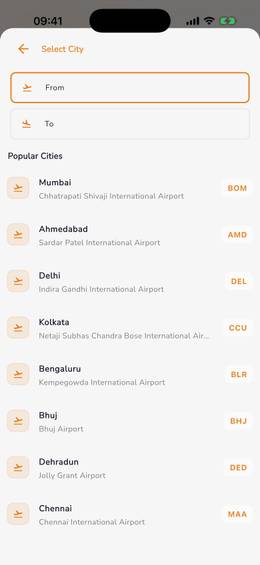
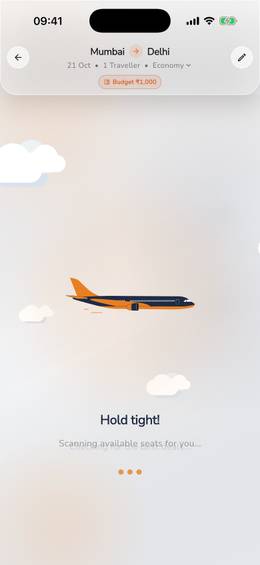
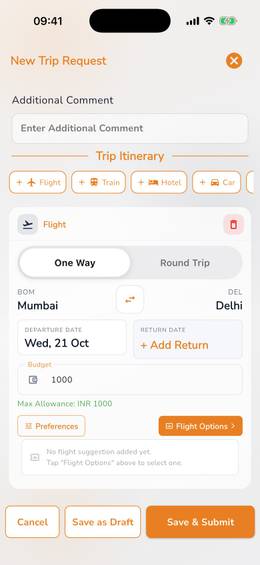
Flights are searched inside the trip request, and each fare is checked against your travel policy.
Each fare carries a badge that says whether it is in policy or needs approval. The traveller can open the fare rules before choosing.
After approval the ticket is issued, and it stays on the trip.
Corporate tickets are paid from the company's travel wallet in Xpense.
A booking is cancelled from the same screen. The charges are shown before the traveller confirms.
A person with the permission can book on behalf of a colleague.
International trips can be booked, including trips with several passengers.
In the mobile app, "Book a flight" has a Business tab. A business booking made there goes to the reporting manager for approval after booking.
An employee can book a personal flight in Xpense, from the Personal tab of "Book a flight" in the mobile app or from Self Travel on the web.
In the app, open "Book a flight" and choose Personal. On the web, open Self Travel.
They search for the flight.
They review the booking before paying.
The employee pays for the ticket themselves.
No trip request and no approval are needed.
In the mobile app, "Book a flight" has a Business tab and a Personal tab. The employee picks Personal, chooses one way or round trip and domestic or international, and fills in the cities, the date, the travellers and the class.
A personal ticket is the employee's own purchase. It does not go through a trip request, it does not wait for an approver, and the employee pays for it online.
Company tickets work the other way: they sit on a trip request, go through approval and are paid from the company travel wallet.
Yes. The traveller cancels from the same screen. The cancellation charges are shown before they confirm.
Each fare shows whether it is in policy or needs approval. The traveller can open the fare rules before choosing.
Corporate tickets are paid from the company's travel wallet in Xpense.
Yes. A person with the permission can book on behalf of a colleague.
Yes. An employee can book a personal flight in Xpense and pay for it themselves.
From the Personal tab of "Book a flight" in the mobile app, or from Self Travel on the web. The employee searches, reviews the fare and pays online, and the ticket is issued.
No. The employee pays for it, so the ticket is issued without a trip request or approval.