Raise a trip request
Enter the purpose and the dates, and add the flight to the trip. Travel policy and city-class limits apply.

The Xpense app is where most employees meet Xpense. They raise a trip, search flights and file expenses from their phone.
The Xpense app is on Google Play and the App Store. Employees raise trips and file expenses from it.


These are captures from the app.
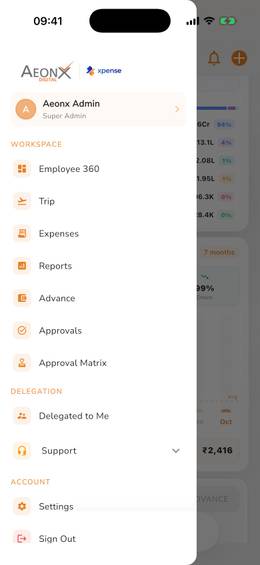
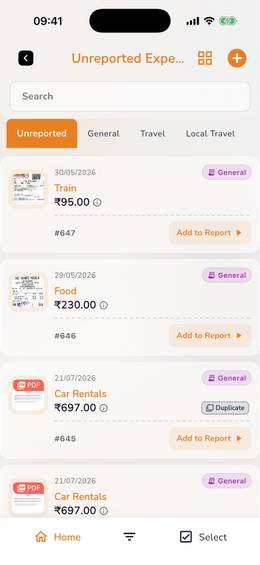
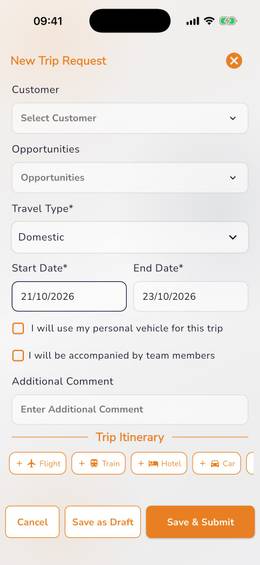
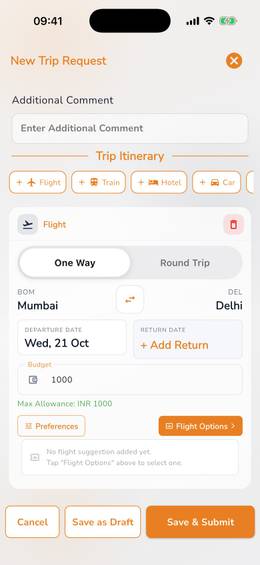
Enter the purpose and the dates, and add the flight to the trip. Travel policy and city-class limits apply.
Search one-way or round-trip inside the trip request. Each fare is checked against your travel policy.
"Book a flight" has a Business tab and a Personal tab. A business booking made there goes to the reporting manager for approval after booking.
Air ticket bookingTake a photo of the receipt. It is read automatically, and a duplicate is flagged.
Create a trip or log an expense by chat.
AeonX IQ has its own Chat tab in the app. It takes a photo or a PDF of a bill and has a voice mode.
Utility bills can be filed from the mobile app.
With the AeonX Prepaid Card, scan and pay from the app using the card balance.
The cardYes. Xpense has a mobile app for Android and iOS, on Google Play and the App Store.
Raise a trip request, book business and personal flights, and file expenses with receipts that are read automatically.
Yes. AeonX IQ is the assistant inside Xpense, and an employee can create a trip or log an expense by chat.
With the AeonX Prepaid Card they can pay by UPI: scan and pay from the Xpense app using the card balance.