Available
Issued and managed from Xpense
The AeonX Prepaid Card is a prepaid card for employee business spend. It is issued and managed from Xpense.

The AeonX Prepaid Card is a prepaid expense card for employees. The card is issued and managed from Xpense, and what is paid with it comes into Xpense for expense reporting.
The AeonX Prepaid Card is a prepaid card for employee business spend. It is issued and managed from Xpense.
The employee scans and pays from the Xpense app, using the card balance.
Card payments come into Xpense for expense reporting.
The company funds a pool account.
The company tops up each member's wallet from the pool.
A member can request a top-up.
The home screen of the Xpense app has a Pay via UPI row.
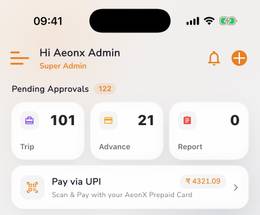
Each payment appears in Xpense, under My Payments.
The member attaches the receipt to the payment.
The member can tag the payment to a trip.
Card payments come into Xpense for expense reporting.
A member can freeze their card.
A member can report the card lost.
Admins set spend controls for each member.
Admins see every transaction in a list.
It is a prepaid card for employee business spend. The card is issued and managed from Xpense.
Yes. In the Xpense app they scan a QR or pay to a UPI ID, choose the spending category, and confirm in the AeonX Prepaid Card app.
The company funds a pool account and tops up each member's wallet. A member can also request a top-up.
Each payment appears in Xpense. The member attaches the receipt and can tag the payment to a trip.
A member can freeze the card or report it lost. Admins set spend controls for each member and see every transaction.
Card payments come into Xpense for expense reporting.