Flights
Search, policy check, approval, ticketing and cancellation happen in one flow, inside the trip request.
Air ticket booking
A business trip starts as a request in Xpense. The employee adds the flights and the hotel to it, the manager approves, and the booking stays on the trip.
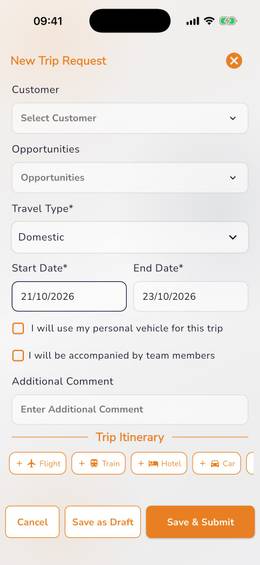
The employee enters the trip name, the purpose, whether the trip is domestic or international, and the dates. Then they add what the trip needs: a flight, a hotel.
Your travel policy and city-class limits apply to the request, so the employee sees what is allowed while they plan.
Search, policy check, approval, ticketing and cancellation happen in one flow, inside the trip request.
Air ticket bookingDomestic hotel booking is available.
The trip goes through your approval levels. After approval the ticket is issued and stays on the trip.
The flight search runs inside the trip request. Each fare is checked against your travel policy, so the traveller knows which options are within policy before choosing.
If plans change, the traveller cancels from the same screen. The charges are shown before they confirm.
Air ticket booking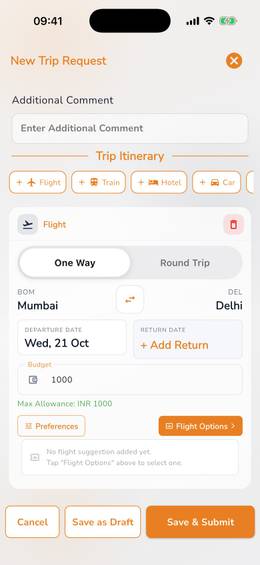
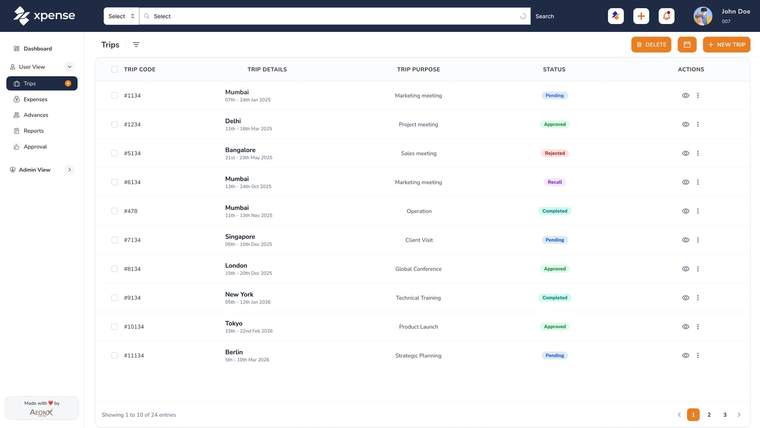
The portal lists every trip with its destination, purpose and status. Xpense has a travel dashboard, and each trip keeps a timeline of its approvals and actions.
The employee enters the purpose, the travel type and the dates, and adds the flights and hotels the trip needs. Your travel policy and city-class limits apply to the request.
Yes. They search flights inside the trip request, and each fare is checked against your travel policy. After approval the ticket is issued and stays on the trip.
One-way or round-trip, the dates from a fare calendar, the cabin class and their traveller preferences.
Yes. The traveller cancels from the same screen. The cancellation charges are shown before they confirm.
Yes. International trips can be booked, including trips with several passengers.
Domestic hotel booking is available in Xpense.