







Create a trip or log an expense by chat
Tell AeonX IQ where you are going or what you spent. It creates the trip request or logs the expense.
AeonX IQ
Xpense is travel and expense management software from AeonX Digital. Employees raise a trip, book the flight and file their expenses in it. Finance sets the policy, approves by level and posts approved reports to SAP.

Each area has its own page. They share the same employees, policies, company structure and approval levels.
Expense claims, receipts and policy checks
Trip requests, flight booking and domestic hotel booking
Flight search, policy check, ticketing and cancellation
Multi-level approval workflows, approval and action logs
Advances, petty cash and settlement
Dashboards, report exports and GST details
Utility bills for stores: filing, approval and posting
A prepaid card for employee business spend
Every claim is checked against the policy you set, at the moment the employee submits it.
The claim moves through your approval levels. An approver who is away can delegate, and a waiting approval gets a reminder.
Finance, managers and the travel desk each have a dashboard for what is theirs to watch.
Approvals and actions are logged, and each trip, expense and advance keeps its own timeline.
A trip starts as a request: the purpose, the dates and where the employee is going. Your travel policy and city-class limits apply to it.
The employee searches flights inside the request, and each fare is checked against the policy. After approval the ticket is issued and stays on the trip. Domestic hotel booking is available too.
How travel works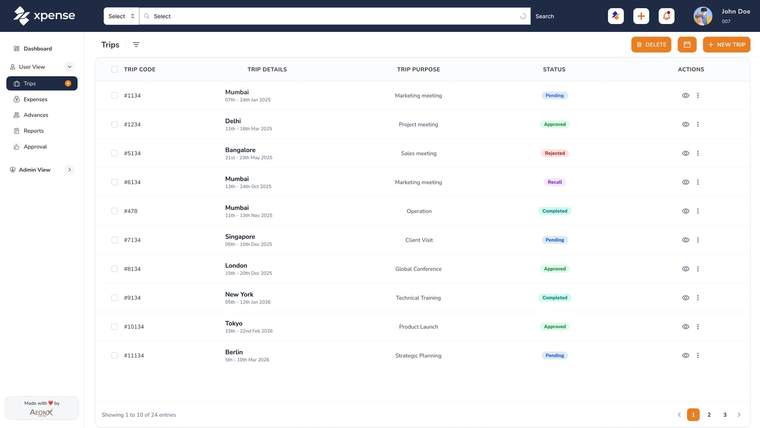
Employees file from the mobile app, from the web, or by chatting on WhatsApp. A photo of the receipt is read automatically, and a receipt that was already submitted is flagged as a duplicate.
Mileage is calculated from the route and the rate for the vehicle. GST details are captured and validated when the claim is submitted.
How expenses work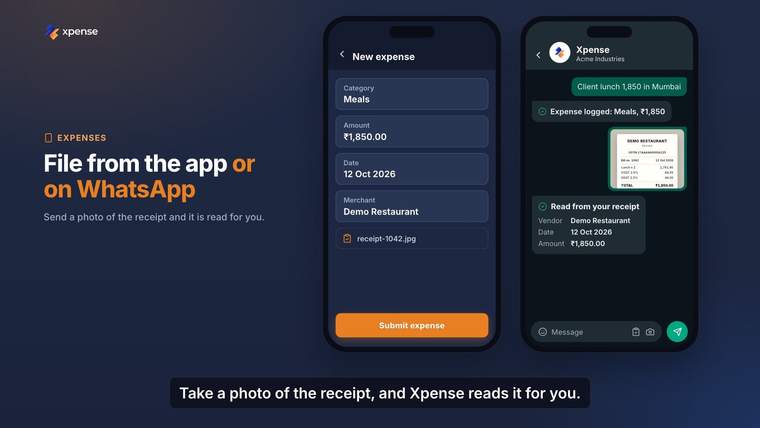
You set the policy once. Xpense checks each claim against it when the claim is submitted. The check is rule-based.
Approval workflows have as many levels as you need and are set per module and per company. The approval request also arrives on WhatsApp, with a link that opens it in Xpense.
How approvals work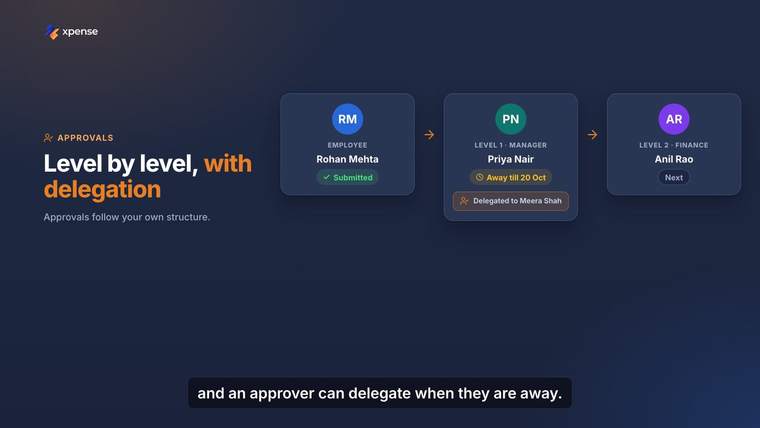
AeonX IQ is part of Xpense. It is switched on per company, and its usage is metered.
Tell AeonX IQ where you are going or what you spent. It creates the trip request or logs the expense.
AeonX IQAeonX IQ writes a summary on each expense report for the approver.
Employees file expenses and create trips by chat on WhatsApp.
On WhatsAppAI assistants and agents that speak the Model Context Protocol can work with Xpense, under the employee's own sign-in.
MCP serverWhen an expense report is approved, Xpense posts it to SAP with GL mapping. Your company groups, companies, business units, plants and cost centres are set up in Xpense.
Tally voucher export is available. Advances, petty cash and settlement are tracked from the request to the settlement, in more than one currency.
SAP integration and exports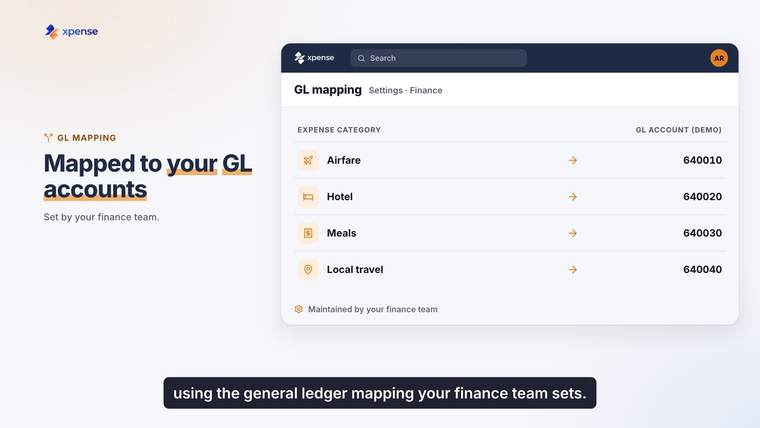
Raymond brought travel, spend and reimbursement into Xpense. The figures below are from the customer story video.
From the Raymond customer story, August 2026.
Read the Raymond storyEach role sees and does only what you allow. Approvals and actions are logged.
Sign in with Microsoft is available.
Integration credentials are encrypted at rest.
AI features are switched on per company from an AI control plane, and AI usage is metered with plans and budgets.
A prepaid card for employee business spend, issued and managed from Xpense.
The cardStores file their utility bills in Xpense. Bills follow their own approval chain and post to SAP as vendor invoices.
Utility billsAn employee can book a personal flight in Xpense and pay for it themselves.
Air ticket bookingXpense is priced per user, by custom quote, and is also available in AWS Marketplace.
PricingBook a demo and tell us what you want to see. We reply within one business day.
Book a demoXpense is the travel and expense management platform from AeonX Digital. It covers trip requests, flight and domestic hotel booking, expense claims, approvals, advances and reports, with a mobile app for Android and iOS.
A trip starts as a request and is booked inside Xpense. Expenses are filed, checked against your policy when they are submitted, and approved level by level. Approved expense reports are posted to SAP.
Yes. They search flights inside the trip request, and each fare is checked against your travel policy. After approval the ticket is issued and stays on the trip.
Yes. Receipts are read automatically using OCR. The employee checks what was read and submits the claim.
When it is submitted, before it reaches an approver. Every claim is checked against the policy you have configured.
AeonX IQ is the assistant inside Xpense. An employee can create a trip or log an expense by chatting with it.
The Model Context Protocol (MCP) is an open standard for connecting AI assistants and agents to business systems. Xpense has an MCP server, so assistants and agents that speak the protocol can work with Xpense.
Yes. Xpense posts approved expense reports to SAP, with GL mapping.
It is a prepaid card for employee business spend. The card is issued and managed from Xpense.
Xpense is priced per user, by custom quote. AI usage is metered separately, with plans and budgets.
Xpense is a product of AeonX Digital. These are company credentials of AeonX Digital.




AeonX Digital is certified to ISO/IEC 27001, ISO 9001 and ISO/IEC 20000-1.
The Xpense app is on Google Play and the App Store. Employees raise trips and file expenses from it.